Asking your guests to complete a survey is a simple and effective way to improve your ratings. But it needs to include the right questions and be sent at the right time.
In this article, we've put together a ready-to-use guest satisfaction survey template with 15 proven questions that you can paste straight into your next guest message.
We also cover the different types of survey, when to send them, and how to use the responses to improve your ratings.
You will also learn how Minut increases visibility across your portfolio so you can protect guest comfort and get better reviews.
What questions should you include in a guest satisfaction survey?
The main goal of a guest satisfaction survey is to gauge the experience of your guests throughout their stay — whether you're managing vacation rentals or a boutique hotel, guest feedback works the same way. It's an opportunity to find potential for improvement in your service.
You can customize your surveys based on the specific feedback that's most important to you. For example, if you have a digital guest book or recommendations for the area, you could ask your guests if they found the information useful or what else they would like to see included.
Equally, if you've added automated guest messaging as part of your service, use the survey to understand how the guest experienced this and what improvements you can make so they have all the support and guidance they need.
Free guest satisfaction survey template
These 15 questions cover the areas that matter most for vacation rental reviews. Mix rating scales with open-ended questions so you get both measurable data and specific suggestions.
Copy these into your PMS guest messaging, a Google Form, or whichever tool you use, and adjust the wording to match your brand.
Overall experience
On a scale of 1 to 10, how would you rate your overall stay?
Did the property match the photos and description in the listing?
What was the highlight of your stay?
Cleanliness
On a scale of 1 to 5, how would you rate the cleanliness of the property on arrival?
Were there any areas that needed attention during your stay?
Communication
On a scale of 1 to 5, how would you rate our responsiveness before and during your stay?
Did you receive all the information you needed before check-in (directions, entry instructions, house rules)?
Amenities and property condition
On a scale of 1 to 5, how satisfied were you with the amenities provided (kitchen, internet connection, linens, outdoor space)?
Was anything missing that you expected based on the listing?
Did all appliances and fixtures work properly?
Check-in and check-out
Was the check-in process straightforward? If not, what went wrong?
On a scale of 1 to 5, how easy was the check-out process?
Likelihood to recommend
On a scale of 0 to 10, how likely are you to recommend this property to a friend or colleague?
Would you book with us again? (Yes / No / Maybe)
What could we have done differently to earn a higher rating?
Questions 1, 4, 6, 8, and 13 give you quantifiable scores you can track over time. Questions 3, 5, 9, 11, and 15 give you the detail behind those numbers.
Feel free to copy this template directly or adapt the questions to fit your properties. If you manage multiple listings, keep the core questions consistent so you can compare performance across your portfolio.
Types of guest surveys: pre-stay, mid-stay, post-stay
Most hosts only send surveys after the guest checks out. That misses two valuable windows where a quick question or two can prevent problems and shape expectations.
Pre-stay surveys
When to send: Three to seven days before check-in.
A pre-stay survey is short, two or three questions at most. The goal is to learn what the guest expects so you can meet those expectations or manage them early.
Good pre-stay questions:
What is the main purpose of your trip? (Relaxation, work, family event, celebration)
Do you have any special requirements we should know about? (Accessibility, early check-in, cot or high chair)
What time do you expect to arrive?
This information helps you personalize the welcome and avoid mismatches. If a guest mentions they’re celebrating an anniversary, a small gesture goes a long way for your review. If they flag an early arrival, you can coordinate cleaning schedules ahead of time.
Mid-stay surveys
When to send: Day two of a five-night stay, or around the midpoint for longer bookings.
A mid-stay survey should be two or three questions maximum. The guest is on holiday, they don't want homework. The purpose is to catch fixable issues before they become checkout complaints.
Good mid-stay questions:
Is everything in the property working as expected?
Is there anything we can do to improve your stay right now?
If a guest reports a broken appliance or missing item on their second day, you can fix it by the third day. That turns a potential three-star review into a five-star review. Without the mid-stay check-in, you would only find out if they complained or at post-stay, which is too late to fix the problem.
Post-stay surveys
When to send: Within 24 hours of checkout.
This is the traditional guest satisfaction survey, and it's where most of the template questions above apply. If you list on Airbnb, a customer survey after checkout can directly influence your Superhost rating and search placement. Send it while the stay is fresh. After 48 hours, response rates drop sharply.
Post-stay surveys should cover the full experience: cleanliness, communication, amenities, check-in, and likelihood to recommend. This is also where you ask for a Net Promoter Score (question 13 in the template) and collect specific suggestions.
Include a line thanking them for their stay and making it clear the survey takes under three minutes. Guests are more likely to respond when they know the time commitment upfront.
How to build a guest survey for vacation rentals
Before you begin to put together your survey, there are a few steps to bear in mind that will help keep your questions relevant and focused.
1. Map out your goals
What are you looking to achieve by sending a guest satisfaction survey? Are you hoping to make your check-in process smoother, improve cleanliness, or enhance your communication?
To help you narrow down on key issues, use guest reviews to identify possible weaknesses in the guest experience.
For example, a guest leaves a mostly positive review but notes that the kitchen lacked essential items. In this case, you could target this issue in your survey by asking for specific suggestions on what kitchen equipment and supplies to add to the property.
Alternatively, if you've recently added a new amenity to a property, such as a smart thermostat, you could use your guest survey to see if the guest found it easy to use and if it enhanced their experience. This might help you decide if it's worth implementing across all your vacation rentals.
2. Keep questions simple
Use direct language that avoids any confusion. Imagine you want to know if the guest was happy with the level of communication about the location of the property, house rules, and amenities. If you ask the following question, you might not be able to make full use of the response:
How happy were you with the level of communication during your stay?
Instead, make sure your question leaves as little open to interpretation as possible:
Did you receive enough information about the location of the property and its amenities before your stay? If not, what information was missing?
3. Use closed questions
It makes sense for the majority of your questions to be yes or no, or a rating out of five, as these are simpler for the guest to answer and faster for you to interpret.
For example, you could ask:
Was the check-in process smooth and easy? (Yes/No)
How would you rate the cleanliness of the property? (1-5)
Did you find the communication about house rules clear and helpful? (Yes/No)
4. Use open-ended questions in addition to closed questions
While closed questions are useful, you might benefit from also including some open-ended questions which allow guests to give more detailed feedback and suggestions for improvements.
For example, you could ask:
Is there anything that could be improved about the check-in process and why?
What was your favorite amenity in the property?
What could we have done to make your stay more comfortable or enjoyable?
5. Review and update your guest surveys
Your surveys should take no more than five minutes to complete. Test out a few different versions with different guests and decide how easy it was to review the feedback.
Did you get the answers you were looking for? Did the feedback provide useful information that helps you make decisions about your services and amenities?
Based on your assessment, refine and update your surveys to keep them as helpful as possible to your operations and business.
How to use Net Promoter Score to measure guest satisfaction
Net Promoter Score (NPS) is one of the simplest ways to put a number on guest satisfaction. It comes from a single question: "On a scale of 0 to 10, how likely are you to recommend this property to a friend or colleague?"
Responses fall into three groups:
Promoters (9-10): Loyal guests who will rebook and refer others.
Passives (7-8): Satisfied but not enthusiastic. They won't leave a bad review, but they're unlikely to go out of their way to recommend you.
Detractors (0-6): Unhappy guests who may leave negative reviews or discourage others from booking.
The formula: NPS = % Promoters - % Detractors. The result is a number between -100 and +100.
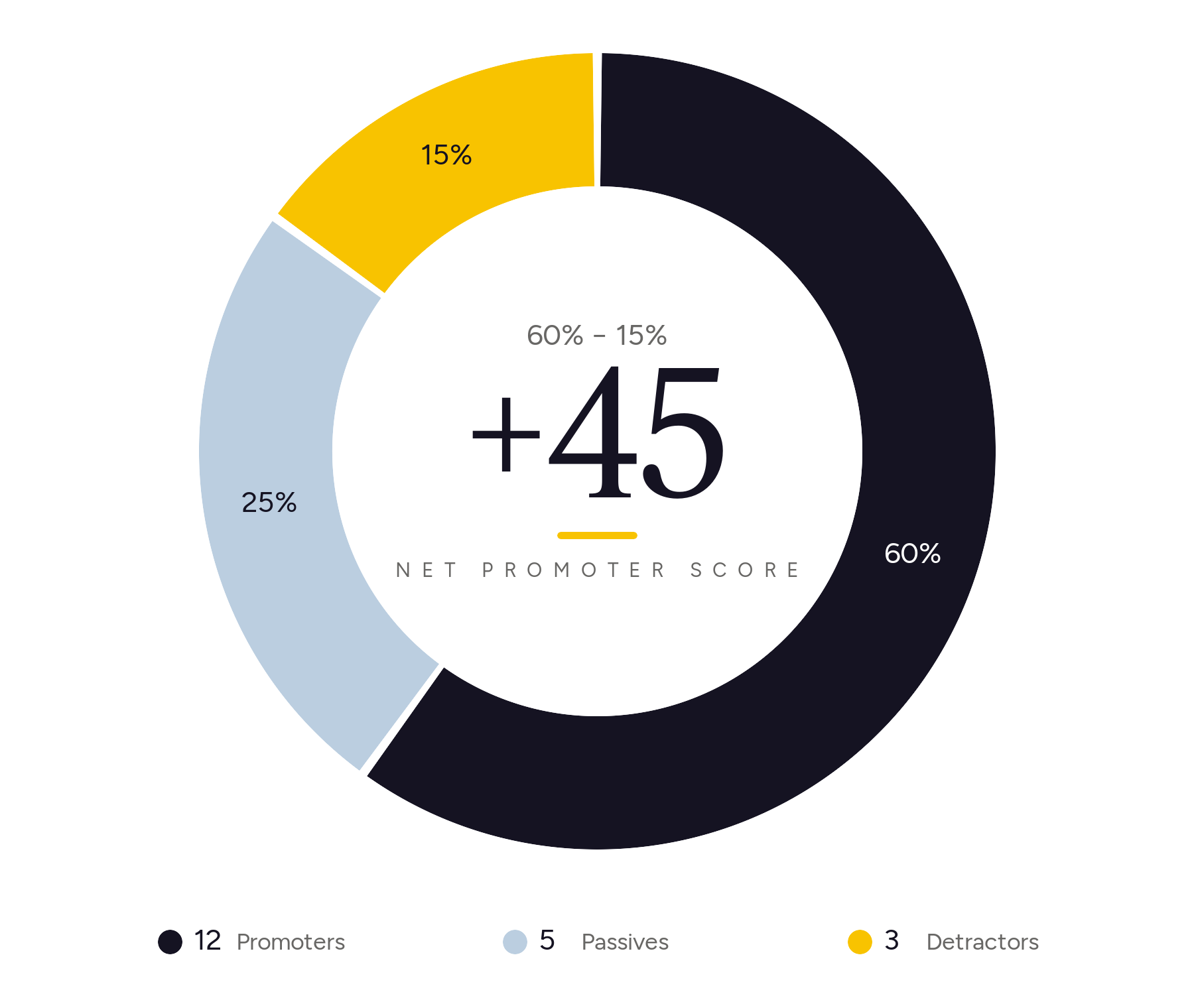
Say you survey 20 guests after checkout:
12 rate you 9 or 10 (Promoters) = 60%
5 rate you 7 or 8 (Passives) = 25%
3 rate you 0 to 6 (Detractors) = 15%
NPS = 60% - 15% = +45
What your NPS means for vacation rentals
NPS range
What it means
50 or above
Excellent. Your guests are actively recommending you.
30 to 49
Good. Most guests are happy, but there's room to convert passives into promoters.
Below 30
Needs work. Look at your detractor feedback to find the recurring issues.
Track your guest satisfaction score monthly or quarterly. A single NPS is a snapshot, what you want to observe is the trend over time.
When's the best time to send a guest survey?
Timing matters as much as the questions themselves. Send too early and the guest hasn't formed an opinion. Send too late and they’ve moved on.
Survey type
When to send
Recommended channel
Expected response rate
Pre-stay
3-7 days before check-in
Email or PMS automated message
40-60%
Mid-stay
Day 2 of a 5+ night stay
SMS or in-app message
25-40%
Post-stay (short stays, 1-4 nights)
Within 24 hours of checkout
Email with survey link
20-35%
Post-stay (long stays, 5+ nights)
Within 24 hours of checkout
Email with survey link
25-40%
SMS and in-app messages get faster responses for mid-stay check-ins because guests are already on their phones. For post-stay surveys, email works better because it gives guests time to reflect and write thoughtful answers.
If you use automated guest messaging through your PMS, build these touchpoints into your message sequence so they go out without manual effort.
Survey tools for vacation rental managers
You don't need expensive software to collect guest feedback. Here's how four common options compare:
Tool
Cost
PMS integration
Automation
Ease of use
Google Forms
Free
None (manual share)
None
Very easy, drag and drop
SurveyMonkey
Free tier; paid from ~$25/mo
Limited (Zapier)
Basic email triggers
Easy, templates available
Guesty
Included in Guesty plans
Native (Guesty ecosystem)
Automated post-stay messaging
Moderate, part of larger platform
Hostfully
Included in Hostfully plans
Native (Hostfully ecosystem)
Automated guest messaging
Moderate, part of larger platform
In addition to the tools themselves, you can use Minut’s integrations and automated guest communication to help improve the guest experience, which can lead to better reviews. For example, by integrating Minut with a smart lock, it can share the guest’s unique access code before they check-in, while Minut Messaging can answer a lot of their questions immediately, such as what the internet password is.
What to do with guest feedback
Knowing how to improve guest satisfaction starts with acting on the results you collect. Here's a three-step framework that turns guest comments into operational improvements.
Step 1: Categorize feedback by theme
Group responses into recurring categories: cleanliness, communication, amenities, check-in, noise, location accuracy, and anything else that comes up repeatedly. A spreadsheet works fine for this.
After a few dozen responses, patterns emerge. You might find that 40% of negative comments mention the same issue, like unclear parking instructions or inconsistent internet connection.
Step 2: Prioritize by frequency and severity
Not all feedback deserves the same urgency. A complaint that appears in eight out of 20 surveys and directly affects the guest's comfort (broken heating, noisy neighbors) ranks higher than a one-off request for a specific brand of coffee.
Plot issues on a simple grid: how often does it come up, and how much does it affect the guest experience? Start with high-frequency, high-severity items.
Step 3: Follow up with the guest
Close the loop. If a guest flagged a specific issue and you've fixed it, send a short message letting them know. Something like: "Thanks for mentioning the kitchen lighting, we've added a brighter fixture. Hope to welcome you back."
This does two things: it shows the guest their feedback mattered, which increases the chance they rebook, and it can convert a lukewarm review into a positive update.
Share findings with your team and property owners. Summarize the top three themes from recent surveys and the actions you are taking. Property owners want to see that their manager is listening to guests, and your cleaning or maintenance team needs to know what guests are noticing.
Get good feedback while respecting guest privacy
Gathering feedback is only half of the equation. You need to turn that information into concrete steps that improve the guest experience across the full journey, from pre-booking to post-checkout.
Act on what guests tell you and your ratings improve. You also build the kind of specific, credible feedback you can reference in your listings and marketing.
To take this further and give guests a better experience without intrusive monitoring, consider a sensor like Minut. It detects noise levels, cigarette smoke, and occupancy changes so issues get resolved before they become bad reviews.
Minut’s M3 sensor includes:
Noise monitoring with custom thresholds for daytime and quiet hours
Cigarette smoke detection to keep your properties safe from damage
Occupancy monitoring with early warning when there's a party risk
Climate monitoring to mitigate the risk of mold
Home alarm with motion detection to keep your units safe between bookings


.jpeg)






.jpg)